
Puppeteer and Selenium tend to pop up any time you talk about browser automation, scraping, or UI testing. Puppeteer is the younger, Chrome focused toolkit that feels natural to modern JavaScript developers, while Selenium is the long standing workhorse behind countless cross browser test suites. In this article, we’ll unpack how they work, look at their pros and cons, and outline what to consider so you can choose the best option for your next project.
HTTP Proxies are handling HTTP requests towards the internet on behalf of a client. They are fast and very popular when it comes to any kind of anonymous web browsing.
Puppeteer is a Node.js library that lets you drive Chromium based browsers with code instead of clicks. You write JavaScript or TypeScript, Puppeteer sends your instructions through the DevTools protocol, and the browser behaves as if a real user were behind the screen. It fits naturally into modern JS projects that use async functions and modules.
In daily work, you reach for Puppeteer when you want a real browser to handle the boring parts. It can launch headless or full Chrome, move through multi step flows, handle complex JavaScript heavy pages, and grab the data, screenshots, or PDFs you need. That mix of control and speed is why it is popular for scraping, automation, and internal tools.
Selenium is more of a toolkit than a library by itself. At its foundation is Selenium WebDriver, which will allow you to make use of actual browsers such as Chrome, Firefox, Edge, Safari, and many others directly from your own code. Then comes Selenium IDE, which is capable of recording and playing back user interactions, and Selenium Grid, which allows you to run many tests in parallel across multiple machines and environments.
A team may have to use Selenium if it is required to craft authentic and trustworthy tests for UI and end-to-end tasks for different browsers. Tests can also be written using Java, Python, C#, JavaScript, or Ruby and can be integrated into your continuous integration setup so that they automatically run for each new build created.
If you are building an internal scraper where you control the environment and only need Chrome, Puppeteer is usually simpler. If you ship a public app and have to sign off on multi browser compatibility, Selenium is the safer long term bet.
Ask yourself: where does your team feel most at home? The answer often pushes you toward one tool or the other immediately.
For quick experiments, PoCs, and one off scrapers, Puppeteer usually gives you faster feedback. For long living test suites with a lot of stakeholders, Selenium can be easier to integrate into formal processes.
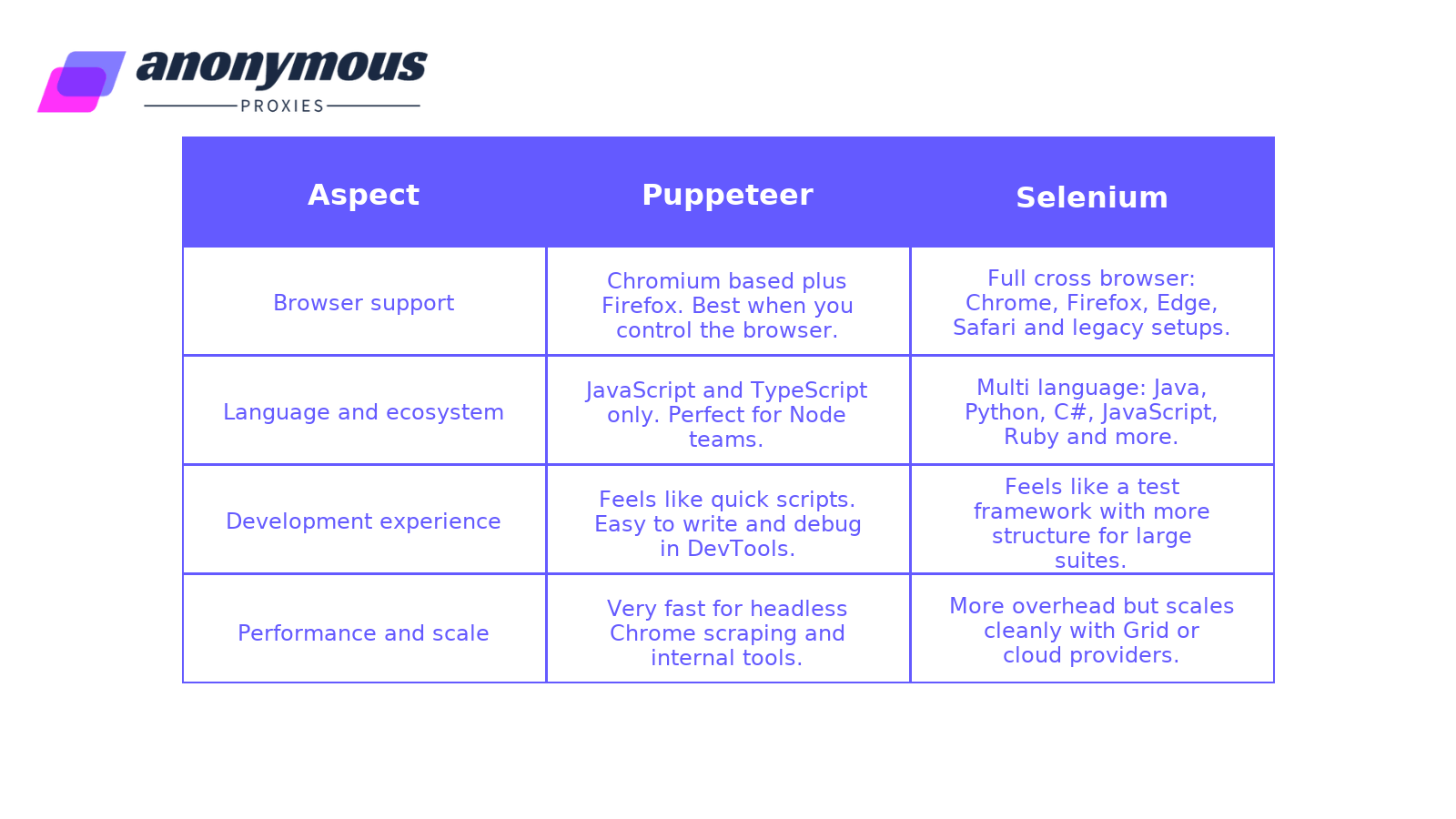
Raw speed depends heavily on how you write and run your scripts, but general patterns look like this:
Either way, when you combine them with our rotating residential proxies, the bottleneck is often the target site and network, not the automation library.
To keep things simple, we’ll stay in Node.js and use a generic demo URL like https://example.com. The goal isn’t to build a full scraper, but to show how each tool feels in common tasks such as opening a page, waiting for content, grabbing some text, and how you can use a proxy with these tools.
Both are installed from npm. Puppeteer is one package; Selenium needs WebDriver plus a browser driver.
Puppeteer
npm install puppeteer
Selenium
npm install selenium-webdriver chromedriver
Puppeteer
const puppeteer = require("puppeteer");async function getTitleWithPuppeteer() {const browser = await puppeteer.launch({ headless: true });const page = await browser.newPage();await page.goto("https://example.com");const title = await page.title();console.log("Puppeteer title:", title);await browser.close();}
Selenium
const { Builder } = require("selenium-webdriver");const chrome = require("selenium-webdriver/chrome");async function getTitleWithSelenium() {const driver = await new Builder().forBrowser("chrome").setChromeOptions(new chrome.Options().headless()).build();const url = "https://example.com";await driver.get(url);const title = await driver.getTitle();console.log("Selenium title:", title);await driver.quit();}
Same idea, different style: Puppeteer works through page, Selenium through driver.
Imagine the page renders a banner with the class .promo-banner after some JavaScript runs.
Puppeteer
await page.goto("https://example.com");await page.waitForSelector(".promo-banner");
Selenium
const { By, until } = require("selenium-webdriver");await driver.get("https://example.com");await driver.wait(until.elementLocated(By.css(".promo-banner")), 10000);
Puppeteer waits by CSS selector directly. Selenium uses wait plus a condition.
Say you want all item titles inside .item-card h3.
Puppeteer
const items = await page.evaluate(() => {return Array.from(document.querySelectorAll(".item-card h3")).map(el => el.textContent.trim());});console.log(items);
Selenium
const elements = await driver.findElements(By.css(".item-card h3"));const items = [];for (const el of elements) {items.push((await el.getText()).trim());}console.log(items);
Puppeteer runs a tiny function inside the page and returns pure data. Selenium reads each element through WebDriver and builds the array step by step.
Here’s a minimal pattern you can adapt for your own proxy.
Puppeteer
const browser = await puppeteer.launch({headless: true,args: [`--proxy-server=http://HOST:PORT`],});
Selenium
const options = new chrome.Options().addArguments("--headless=new").addArguments("--proxy-server=http://HOST:PORT");const driver = await new Builder().forBrowser("chrome").setChromeOptions(options).build();
Both tools can absolutely do the job, so a better question is what kind of work you actually need to automate.
If you live mostly in a Node.js and Chrome world, Puppeteer will usually feel like the easier, more natural choice. It gives you a modern, high level API, feels similar to working in browser dev tools, and works great for web scraping, crawling, screenshot generation, and small internal tools. Combined with a rotating proxy setup from Anonymous Proxies, it becomes very simple to fire up lots of headless sessions and collect data at scale.
Selenium starts to make more sense when your needs are wider. If you have to support several browsers (Chrome, Firefox, Edge, Safari) or you want to use different languages (Java, Python, C#, JavaScript, and so on), Selenium is the safer option. WebDriver lets you run the same flows across different environments, which is exactly what you want for cross browser checks and larger suites running in CI.
Also, it is not a must to be one or the other. Many teams may use Puppeteer for quick scrapes and automation tasks and retain Selenium for overall cross-browser testing tasks. What works is what suits your tech stack, your team's requirements, and your overall strategy to implement automation everywhere.
When you choose between Puppeteer or Selenium, it shouldn't seem like an overly complicated choice. Now that you’ve seen how they differ, the choice depends on your requirements now. You should use Puppeteer if you’re a Node.js developer or do Chrome-related automation because of its speed and efficiency for web scraping or browser-related tasks. Or if your requirements include support for several browsers or several languages and your tests are larger and run continuously, you should use Selenium.
If you’re still not sure or have questions for your own use case, don’t hesitate to reach out to our team and we’ll do our best to help.

We offer highly secure, (Dedicated or Shared / Residential or Non-Residential) SOCKS5, Shadowsocks, DNS or HTTP Proxies.
DR SOFT S.R.L, Strada Lotrului, Comuna Branesti, Judet Ilfov, Romania
@2025 anonymous-proxies.net